
Download Quiet Read – Efficient Link‑Saver for macOS Snow Leopard
Overview
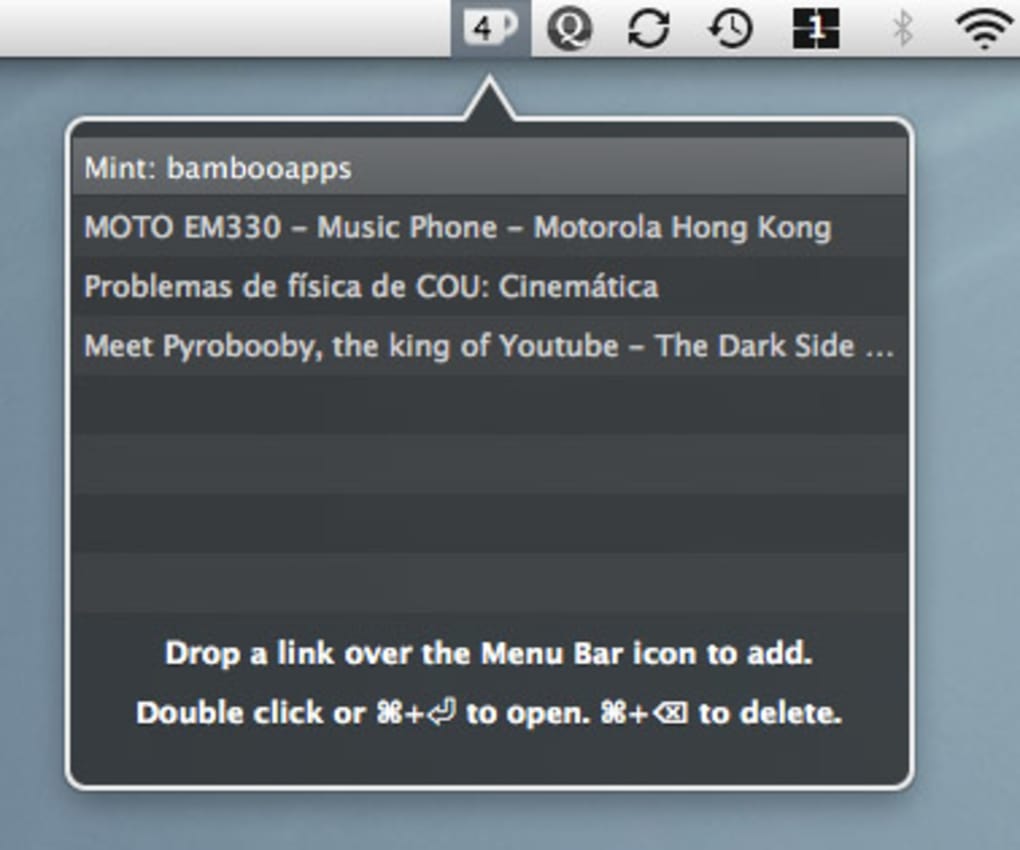
Quiet Read is a lightweight macOS utility designed to help you tame the chaos of un‑read web links. Instead of stuffing bookmarks into a crowded folder or relying on a browser’s built‑in “reading list,” Quiet Read lives in your menu bar and lets you drag any URL onto its icon. Each dropped link increments a small counter, giving you an at‑a‑glance reminder of how many articles are waiting for your attention.
When you’re ready to read, a simple click opens the page in your default browser. The app was built specifically for Snow Leopard (macOS 10.6), and while its feature set is modest, it delivers a fast, secure, and distraction‑free way to store links for later consumption. Recent updates have fixed a Spanish‑localization crash, added a “Move to Archive” menu item, and introduced a handy Cmd‑Option‑F shortcut that focuses the search field instantly.
If you’re frustrated by a cluttered bookmarks bar or a forget‑ful reading queue, Quiet Read offers a no‑frills solution that keeps your reading list visible yet out of the way.
Core Features
- Menu‑Bar Placement: Quiet Read sits unobtrusively in the macOS menu bar, providing instant access without opening a separate window.
- Drag‑and‑Drop Saving: Simply drag any link from Safari, Chrome, or another browser onto the Quiet Read icon to add it to your queue.
- Unread Counter: A numeric badge shows how many links remain unread, giving you a quick visual cue.
- One‑Click Opening: Click a listed URL to launch it in your default web browser instantly.
- Contextual Menu Options: Right‑click a link for actions such as “Open,” “Move to Archive,” or “Remove.”
- Search Shortcut: Use Cmd‑Option‑F to focus the search field, letting you locate a specific link in seconds.
- Localization Fixes: Updated Spanish translation and bug resolutions improve stability on Snow Leopard.
While Quiet Read lacks advanced tagging or preview capabilities, its simplicity is intentional. By focusing on a single, well‑executed workflow—saving and retrieving links—it avoids the bloat that can slow down older Macs. The app integrates seamlessly with the operating system, respects privacy (no data is sent to external servers), and runs efficiently on hardware dating back to 2009.
Installation, Usage & Compatibility
Downloading & Installing: Quiet Read is available as a free .dmg file. Click the “Download Quiet Read” button on the official site, then open the .dmg and drag the Quiet Read.app icon into your Applications folder. macOS will prompt you to confirm the installation; simply follow the on‑screen instructions. Because the app is signed with a valid developer certificate, macOS Gatekeeper will allow it to run without additional security warnings.
First‑Run Setup: Launch Quiet Read from your Applications folder. The app automatically adds an icon to the menu bar. No configuration wizard is required—just start dragging links onto the icon. If you prefer a different keyboard shortcut for focusing the search field, you can customize it in the Preferences window, accessed via the dock icon’s contextual menu.
Using Quiet Read Effectively: To save a link, click and hold the URL in your browser’s address bar, then drag it onto the Quiet Read icon. The counter increments, and the link appears in a drop‑down list when you click the icon. To read an article, click its title; it opens in your default browser. After reading, right‑click (or Cmd‑click) the entry and select “Remove” or “Move to Archive” to keep the list tidy. The archive feature stores links in a separate list, useful for references you might need later.
macOS 10.6 Snow Leopard is the sole supported platform. Quiet Read leverages native menu‑bar APIs that were deprecated in later macOS releases, so it will not run on macOS Lion or newer. If you’re on a modern Mac, consider running Snow Leopard in a virtual machine or using an older hardware Mac for the best experience.
Pros & Cons
Pros
- Fast, lightweight, and consumes negligible system resources.
- Intuitive drag‑and‑drop workflow eliminates the need for manual bookmarking.
- Always‑visible unread counter keeps you aware of pending reads.
- One‑click opening integrates smoothly with your default browser.
- Free to download and use, with no hidden subscription fees.
- Secure—no data leaves your machine, preserving privacy.
- Recent updates fix localization bugs and improve stability.
Cons
- Limited to macOS 10.6 Snow Leopard; not compatible with newer macOS versions.
- No built‑in tagging, categorization, or preview of saved links.
- The unread counter does not automatically decrement after reading a link.
- Links must be removed individually; bulk‑delete requires manual selection.
- Absence of cloud sync means the list is confined to a single device.
FAQ – Frequently Asked Questions
Can Quiet Read sync my links across multiple Macs?
No. Quiet Read stores links locally on the machine where it is installed. For cross‑device syncing you would need to use a cloud‑based service like Pocket or Instapaper.
Is there a way to export my saved links?
Quiet Read does not include a native export feature. However, you can copy individual URLs from the list and paste them into a text file or spreadsheet manually.
What browsers are compatible with the drag‑and‑drop feature?
Any macOS browser that allows you to drag a URL from the address bar—Safari, Chrome, Firefox, and others—works with Quiet Read.
Can I customize the keyboard shortcut for the search field?
Yes. Open Quiet Read’s Preferences from the dock icon’s contextual menu and assign your preferred shortcut to the “Focus Search” command.
Is Quiet Read safe to download from third‑party sites?
For security reasons, always download Quiet Read from the official website or a trusted source. The app is signed, so macOS will warn you if the binary has been tampered with.
Conclusion & Call to Action
Quiet Read fills a niche that many modern reading‑list apps have forgotten: a no‑frills, menu‑bar utility that lives quietly on older Macs. If you run Snow Leopard and need a fast, secure way to stash links without cluttering your bookmarks, Quiet Read delivers exactly that. While it could benefit from tagging, bulk management, and cloud sync, its core workflow is smooth and dependable. The recent bug fixes and added shortcut make daily use even more pleasant. To try Quiet Read, click the download button below, install the free .dmg, and start dragging those “read later” URLs into your menu bar today.







